SafeHome.org may receive compensation from some providers listed on this page. Learn More
We may receive compensation from some providers listed on this page. Learn More
SafeHome.org may receive compensation from some providers listed on this page. Learn More
We may receive compensation from some providers listed on this page. Learn More
Professionally installed home security systems with innovative inTouch™ devices
 Updated October 1, 2026
copied!
Updated October 1, 2026
copied!
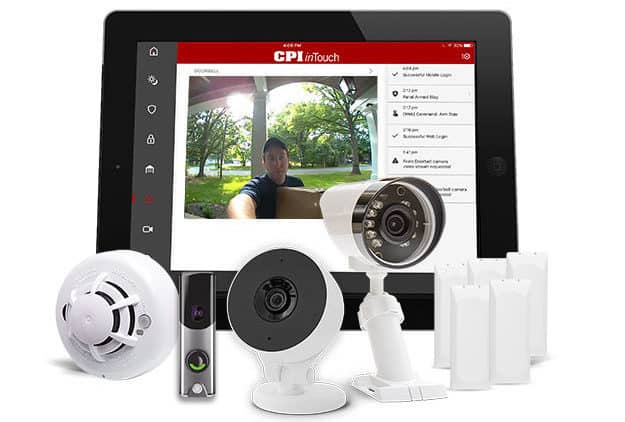
CPI Security looks strong on paper. With more than 30 years in the industry, the company clearly knows home security. But reputation alone isn’t enough for us, so we tested the systems ourselves, evaluating CPI across pricing, equipment, technology, installation, and customer service. A few drawbacks stood out along the way: the equipment runs expensive, availability is limited in certain areas, and customer support wasn’t always consistent.
On the upside, CPI delivers solid video monitoring, a no-false-alarm guarantee, and genuinely innovative inTouch™ devices. That all gives homeowners both peace of mind and smart, modern control over their security. With those benefits, CPI Security is worth a serious look if reliable monitoring and smart home integration are near the top of your priority list. Below, we break down the pros, cons, and costs so you can decide whether it’s the right fit for your home.
Check out more recommendations from the SafeHome team:
CPI Security Systems, Inc. has been around since 1991. And from what we can tell, they’ve been growing steadily over the years. The company’s headquarters is in Charlotte, North Carolina.1
CPI Security has earned consistent recognition in the industry over the years. It was even named The Security Provider of the Year by SDM Magazine.2 Although they’re less known than newer home security startups — think Ring Alarm or SimpliSafe — CPI is still a serious competitor. That said, it’s hard to find accurate information about what they offer as they rarely produce marketing materials.
CPI’s technology has evolved steadily to keep pace with the industry. What started as a basic analog control panel in the early 2010s eventually gave way to the inTouch panel, a tablet-style touchscreen that brought home automation and advanced features to CPI’s premium monitoring packages as competitors introduced similar capabilities. That evolution has continued since, with CPI expanding compatibility across popular smart home ecosystems and growing out its camera and sensor lineup. The platform may not carry the buzz of newer entrants, but the technology itself is modern, reliable, and fully capable of supporting a connected home today.
CPI’s pricing structure surprised us during our research. Monitoring starts at $29.99 per month, which sounds appealing at first. But once we went through the consultation process and credit check (yes, they do require one), we learned that the base rate only applies to the Essentials package. Still, that’s competitive against industry averages for basic coverage, which typically sit around $25 to $35 per month.
Did You Know? Some DIY systems, like Ring and SimpliSafe, offer professional monitoring starting at around $20 per month with no long-term contracts.
The costs climb from there. Equipment is purchased upfront, with most packages starting around $500, depending on configuration. Premium packages that include security cameras and smart locks can easily exceed $1,000. Compared to DIY options like SimpliSafe or Frontpoint, CPI Security represents a significant investment. Here are the current package options.
| Equipment | inTouch™ Essentials | inTouch™ Essentials Plus | inTouch™ Video | inTouch™ Edge |
|---|---|---|---|---|
| Door/Window Sensors | Yes | Yes | Yes | Yes |
| Motion Detection | Yes | Yes | Yes | Yes |
| Motion Sensor | Yes | Yes | Yes | Yes |
| Smartphone Controls | Yes | Yes | Yes | Yes |
| Doorbell Camera | No | Yes | Yes | Yes |
| Outdoor Camera | No | No | Yes | Yes |
| Keyless Door Lock | No | No | No | Yes |
| Standard Keypad | Yes | No | No | No |
| Touchscreen Keypad | No | Yes | Yes | Yes |
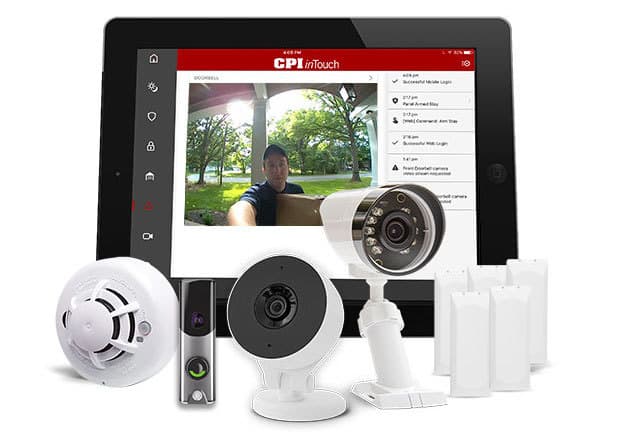
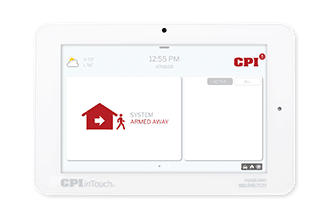
One of the things we like about CPI Security is the ability to customize a system from the ground up. All packages include the touchscreen inTouch™ Smart Hub—except for the Essentials plan, which comes with a simpler wireless panel.
The inTouch Hub packs in a solid set of practical features: battery backup, a built-in camera that captures photos during failed disarming attempts, and two-way audio so you can speak directly with monitoring professionals. The design is sleek and modern — a welcome upgrade from the clunky, outdated panels you’ll still find with some older security companies.
On the downside, CPI Security isn’t transparent about pricing. We had to call for a quote and discovered that the Essentials package wasn’t the right fit for us. While the technology impressed us, the lack of upfront cost information was frustrating.
That said, if the upfront equipment cost feels steep, CPI Security offers 0% financing over 36 to 60 months through the CPI Smart Pay Program.3 That can make the investment more manageable, but you’ll have to call to sign up. Even so, we found that these home security systems aren’t the best fit for folks on a tight budget.
The sign-up process for CPI Security is fairly straightforward. You’ll start by speaking with a sales rep on the phone to go over your options, then pick an equipment package and a monitoring plan. We went with the Edge package and the $49.99 per month monitoring plan. You can find lower rates from budget competitors like SimpliSafe and Cove, but it’s in-line with premium systems like ADT or Vivint.
Now, remember how we mentioned that CPI Security only has limited availability? Well, here’s something to chew on. If you don’t live in one of CPI’s service areas, then you’re out of luck, as CPI only offers service in select states across the Southeast and Mid-Atlantic regions, including:
Another thing to keep in mind is that CPI Security doesn’t offer a money-back guarantee. In our experience, we’re used to decent offers here — like 30-day or 60-day money-back guarantees. ADT actually offers a 6-month money-back guarantee! Knowing that a company stands behind its products helps to instill trust. Alas, CPI doesn’t guarantee anything.
FYI: Although CPI Security doesn’t offer a money-back guarantee, you can exercise your three-day “right of rescission.” This is a federal law stating that you can return your purchase for a full refund within three days of the sale date. It pays to know your rights!4
We like options, and it’s nice to at least have the option for DIY setup. So, we were somewhat disappointed to learn that CPI Security requires professional installation. That said, we’ve almost come to expect it with top brands like ADT and Vivint. Just know that you’ll have to schedule a date and time for a CPI technician to visit your home and get your system up and running.5
Installation typically takes anywhere from 30 minutes to a couple of hours. It just depends on your system size and the layout of your home — so plan your schedule accordingly. The upside to professional installation is that everything is far more likely to be set up correctly from the start. No guesswork, no fumbling with instruction manuals. We can get behind that.
We found CPI’s equipment surprisingly well-made — especially compared to the low-end DIY systems out there. The devices are also somewhat inconspicuous. They didn’t stand out at all against our white walls, which is good for two reasons: It makes them harder to spot for burglars, and it’s less of an eyesore for us.
That said, we ran into a few frustrations along the way. For instance, when we reconfigured our system, the sensors refused to reconnect even after being paired just moments earlier. The motion sensors were also a bit overzealous, triggering false alarms from pets and even our robot vacuum. A few annoyances, sure, but overall the hardware impressed us.
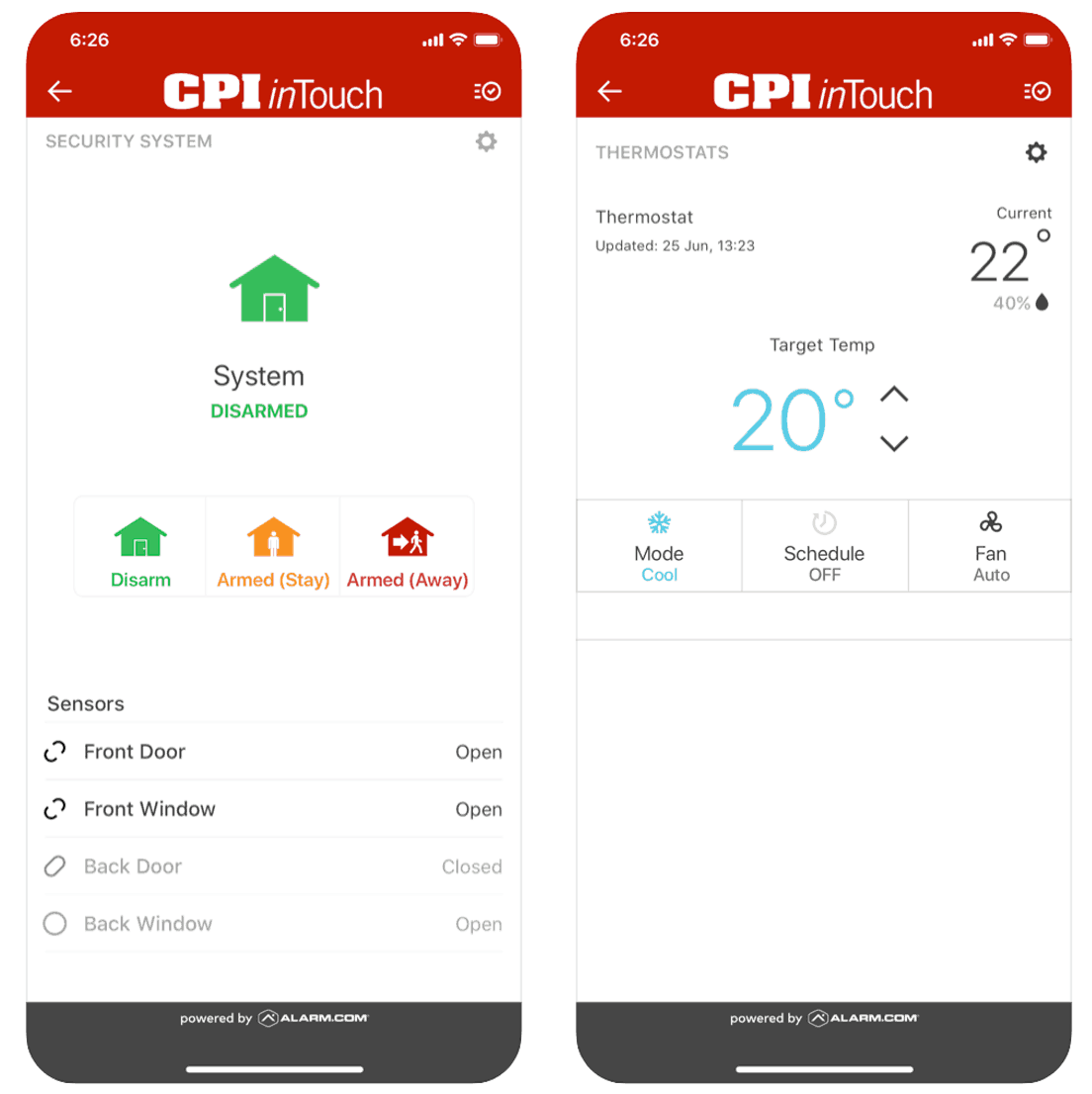
As far as the controls go, we think you’ll like the touchscreen control panel and mobile app. Remember, all their packages (except the base Essentials package) come with the touchscreen InTouch™ panel. It’s a sleek way to arm and disarm your system, view your live video feed, and automate your home with smart features.
As for the app, it’s nice to have control of your system from anywhere using your smartphone.6 We were able to access all the features the inTouch™ panel offers, but from the convenience of our phone. However, we think the interface could use some work. It’s not quite as polished or intuitive as, say, Ring Alarm’s mobile app or SimpliSafe’s app.
One gripe we have with the app is that it’s unnecessarily difficult to navigate. It was easy enough to use to arm and disarm the system, but when we wanted to really dig in and personalize the system – for example, to set up different notification sounds for different types of alerts so we know when it’s urgent to check our phones – things got complicated real fast.
CPI Security also offers a web app accessible through any browser. While it provides more customization options than the smartphone app, it’s clearly designed for desktop or laptop use. Navigating it on a mobile device proved frustrating for us. Aside from using basic controls like arming and disarming, we struggled to make on-the-go changes to our system aside.
And what about the 24-7 professional monitoring? Well, one look at the CPI Security website, and you’ll see they really hype-up their monitoring center. Sure, it’s award-winning. And yes, it’s a UL-listed facility with a TMA 5-Diamond Certification.7 But aren’t most of them? We wanted to know how CPI Security performed in real-world situations. So, we simulated some break-in and package theft scenarios to find out!
Overall, we experienced around 40-second response times. Generally, we look for response times of at least 30 seconds. That said, the video doorbell held its own. In our simulated package theft scenario, it detected movement the moment we stepped into frame. We also appreciated that all CPI cameras deliver 1080p HD video with night vision, so footage stays clear whether it’s noon or midnight.
Pro Tip: UL-listed, TMA 5-Diamond Certification are the industry designations for legitimate monitoring centers, staffed by trained professionals. Most of the larger home security brands meet these standards just fine.
You’ll see that CPI Security offers three main ways to get in touch: phone, online chat, and email. We’ve seen user complaints regarding customer service. Again, we like to get in the trenches and find out for ourselves. Well, what we found was average to less-than-average customer service.
CPI’s call center is open around the clock, but don’t expect a quick answer. Our wait times were inconsistent. One call ended up taking over 10 minutes. Responses felt scripted and impersonal, regardless of how specific our questions were. Whether it’s a bot or a human working from a rigid script, the end result is the same: not very helpful.
There is a Customer Care Help Center tab on their website, but it only has a few resources, none of which we found helpful. It got us wondering how CPI Security earned itself an A+ BBB rating.8 We’d give them a B+ in this category.
CPI Security brings some genuinely strong monitoring capabilities to the table, with a handful of features that stand out from the pack. Based on our hands-on testing of the Edge package, here’s how we’d rank the key monitoring features:
Taken together, these features show a company that clearly understands what modern homeowners expect from a monitored security system. The bigger question is whether CPI’s pricing and limited service area make sense for your situation, which is exactly what we’ll dig into next.
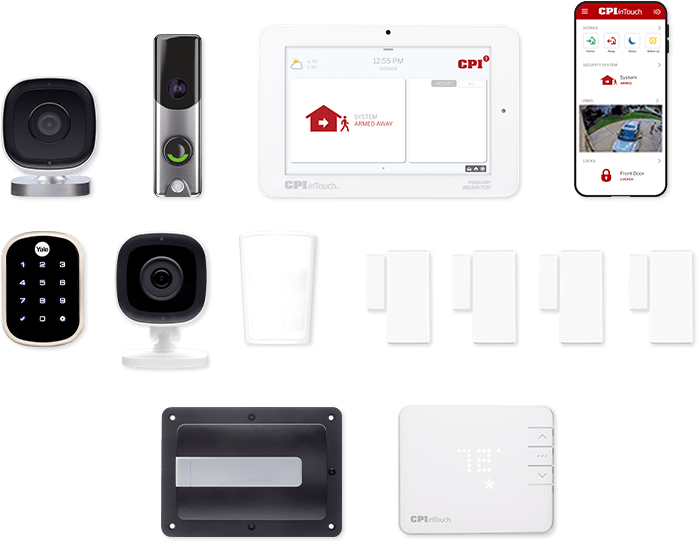
Of all the different components offered by CPI Security, we actually liked the security cameras the most. We purchased an indoor and outdoor camera to see how they measured up against other security cameras on the market. And we were pleasantly surprised. CPI’s four-camera options include:
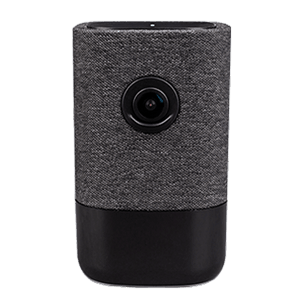
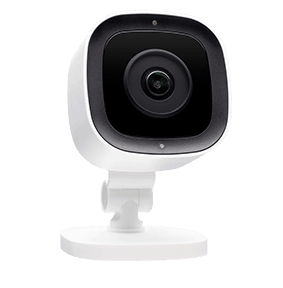
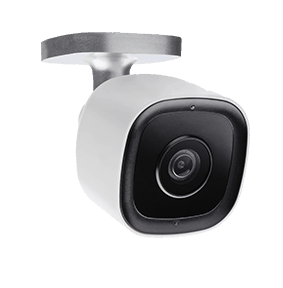
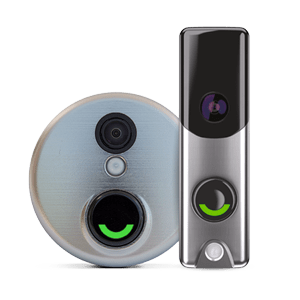
All four cameras impressed us — we’re talking 1080p HD video quality, night vision, Pinch & Zoom, low-light recording, motion detection, and live video streaming. Select models also feature two-way audio. We picked up CPI’s Stream Video Recorder (SVR) service to unlock additional storage for our cameras, though it noticeably increased the price of our system.
CPI Security offers a solid equipment lineup covering sensors, smart home devices, environmental detectors, and cameras. However, the company still doesn’t publish add-on or upgrade pricing on its website. That’s a transparency gap we’d genuinely like to see closed. Most shoppers, including us, want to compare options before picking up the phone. Anyways, here’s a full breakdown of what CPI currently offers:
| Device | Type of Device |
|---|---|
| Entry sensor | Sensor |
| Motion Sensor | Sensor |
| Touchscreen Panel | Controls |
| Wireless Panel | Controls |
| Light Control | Smart Home |
| Smart Thermostat | Smart Home |
| CO Detector | Environmental |
| Smoke Detector | Environmental |
| Touchscreen Door Lock | Entry |
| Garage Door Controller | Entry |
| inTouch 180™ Indoor | Camera |
| inTouch 180™ HD Indoor Camera | Camera |
| inTouch 180™ HD Outdoor Camera | Camera |
| inTouch 180™ Doorbell Camera | Camera |
We’ll tip our hats to CPI Security for a few things: solid video surveillance and their InTouch™ device lineup. IVAN stood out in particular, an AI-driven feature that distinguishes between types of motion to cut down on false alarms, and it kept notifications from feeling excessive during our testing.
That’s largely where the enthusiasm ends. Compared to many top systems on the market, CPI feels pricey and inflexible, especially given the mandatory professional installation. It’s also only available in a handful of southeastern states, a dealbreaker if you don’t happen to live in that footprint.
Still, CPI could work for the right person. If you’re in the south and want solid security, video, and home automation, and don’t mind paying $500 or more for equipment, it might fit the bill. Overall, though, we weren’t especially impressed, and we’d point most shoppers toward more affordable options that deliver just as much, if not more.
Not always. If you purchase the equipment upfront, you can get month-to-month monitoring. If you have to finance the equipment, they will require a 36-month to a 60-month contract.
Unfortunately, CPI Security requires professional installation on all systems.
Yes, in fact, CPI does a great job of offering top quality video surveillance.
You can probably get CPI if you live in the south, but you will have to check with a sales rep to make sure.
CPI Security does not list equipment or monitoring prices on its website, so you’ll need to contact the company directly for a full quote. Based on our research, monitoring plans start around $29.99 per month, and equipment costs typically begin at $500 or more.
Bloomberg. (2020). CPI Security Systems Inc.
https://www.bloomberg.com/profile/company/0196183D:US
Stepanek, L. (2019, May 9). 2019 SDM 100: Above Average. SDM Magazine.
https://www.sdmmag.com/articles/96583-sdm-100-above-average
CPI Security Systems, Inc. (2020). CPI Smart Pay.
https://cpisecurity.com/terms/
Chen, J. (2019, July 13). What Is the Right of Rescission? Investopedia.
https://www.investopedia.com/terms/r/right_of_rescission.asp
CPI Security Systems, Inc. (2020). Professional Installation vs. DIY Home Security.
https://blog.cpisecurity.com/monitored-vs-self-monitoring-home-security-system
CPI Security Systems, Inc. (2020, April 14). CPI Security. Google.
https://play.google.com/store/apps/details?id=com.alarm.alarmmobile.android.cpi&hl=en
The Monitoring Association. (2020). TMA Five Diamond Monitoring Centers.
https://tma.us/programs/fivediamond/