SafeHome.org may receive compensation from some providers listed on this page. Learn More
We may receive compensation from some providers listed on this page. Learn More
SafeHome.org may receive compensation from some providers listed on this page. Learn More
We may receive compensation from some providers listed on this page. Learn More
Eufy is building out its home security line. Now that we’ve tested its latest equipment, we’re paying attention.
 Updated October 16, 2026
copied!
Updated October 16, 2026
copied!

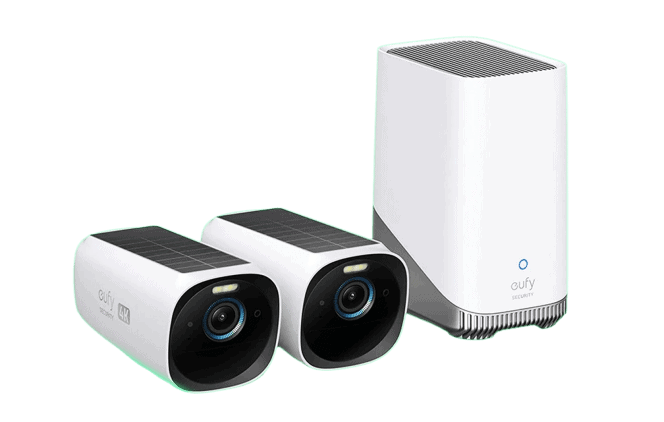
I was eager to test a Eufy home security system, hoping it would become one of my top no monthly fee systems. Its AI face-recognition software, BionicMind™, and its 3rd-gen 4K cameras with solar charging genuinely stood out. However, after thorough testing, I found that it didn’t quite meet the mark compared to the best DIY security systems.
Sure, the BionicMind software helped cut down on false alerts, like late-night raccoons. The solar cameras also eliminated messy cables. That said, it couldn’t quite match the day-to-day performance of top user-friendly competitors like SimpliSafe. Still, it remains a solid option for specific needs.
Here’s my full experience installing and testing Eufy for a week, along with a detailed cost breakdown for each plan and how it stacks up against other top alarm providers.
Pro Tip: Security systems are either self-monitored (you handle security alerts) or professionally monitored (a security service watches your home and contacts authorities when needed). If you’re unsure which fits your lifestyle, check out our home security buyer’s guide for a detailed comparison of both options.
Check out more recommendations from the SafeHome team:
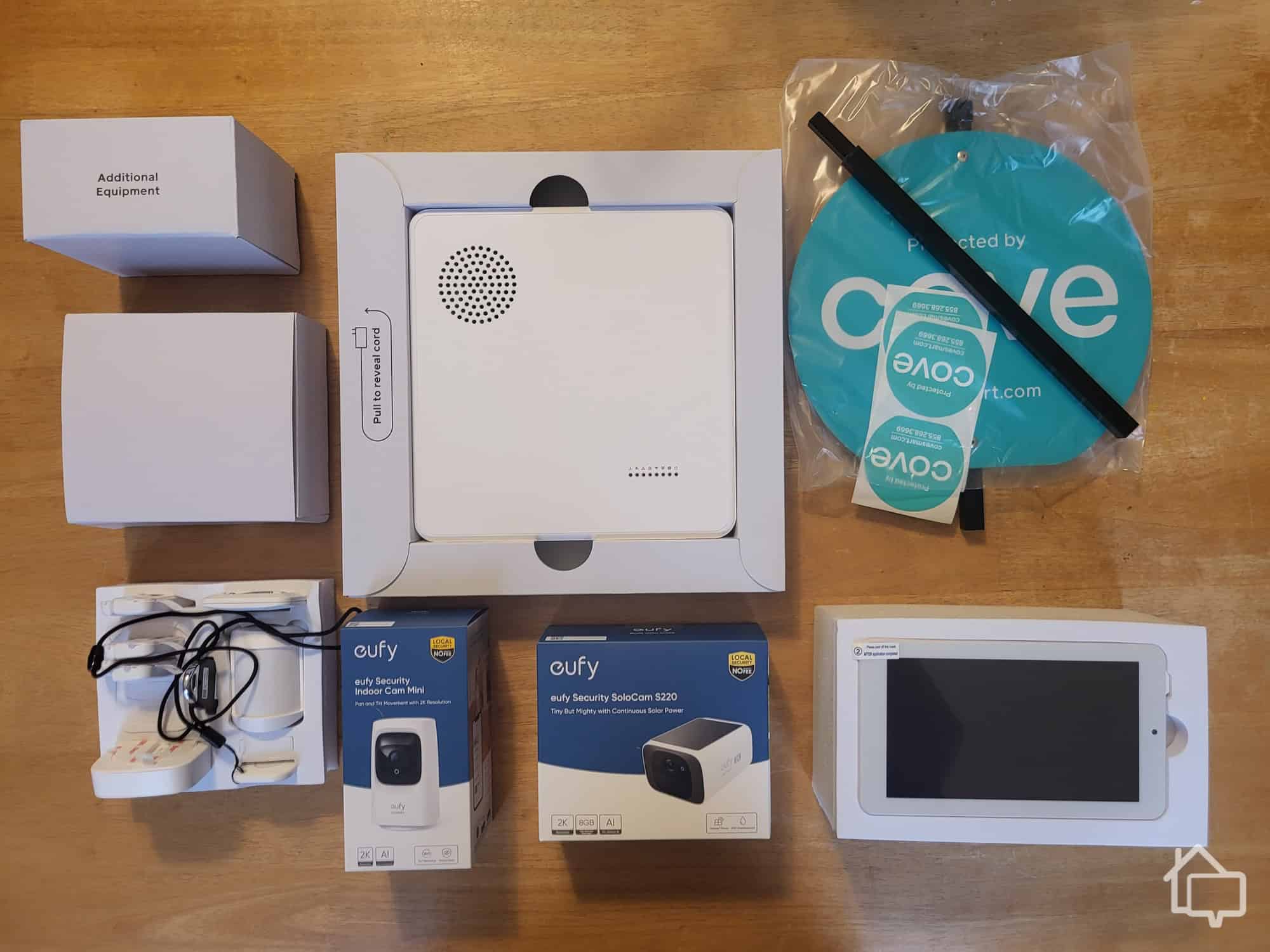
Eufy sells a handful of home security packages at different price points. I chose the Edge Starter Bundle, a midrange package. I’ll explain why I went with this particular system below in my pricing breakdown. For now, I’ll just say my bundle came with:
Here are a few notes on the goodies that came in the box.
One, you may have noticed the absence of motion sensors on my list. That’s because the Edge Starter Bundle didn’t come with any. If you’re like me and you like your motion sensors, you can just add them on for around $30 a pop, rather than upgrading to the much more expensive Edge Advanced Bundle.
Second, my Edge Bundle included an Ethernet cable to connect the HomeBase 3 hub/alarm to the router—Wi-Fi isn’t supported. That’s not a downside; Ethernet is faster and more reliable. Just note that if your router isn’t centrally located, this could be a minor inconvenience.
The HomeBase 3 itself is easy to hear. Its 100-decibel alarm reaches most rooms. Eufy’s cameras, which do run on Wi-Fi, have a range of about 30 feet, so you might need a Wi-Fi extender depending on your setup.
Finally, you might wonder why my system included a USB-C cable. I did too. My eufyCam 3Cs are sleek 4K cameras, but they don’t solar-charge. Lesson learned: always check the fine print.
It didn’t impact me much since I was using the cameras indoors. Eufy says these batteries last up to 180 days per charge. Outdoors, though, I would have opted for the solar-charging cameras to avoid frequent recharging.
FYI: Eufy cameras record events only. They don’t record continuous footage — this despite their enormous 16 TB storage capacity.
Overall, setting up my Eufy security system was easy. It just took a little longer than expected to go fully operational. The eufyCam 3Cs need at least three to four hours to charge, and that’s if you’re using the zippier USB-C cable. The cable plugs right into the HomeBase 3.
The HomeBase 3 comes with 16GB of built-in local storage — roughly two to three months’ worth of clips, which was plenty for me. The advantage of local over cloud storage is that my footage stays private, one of Eufy’s biggest selling points. And unlike many competitors, there are no monthly fees to access your footage.
In late 2022, researchers caught Eufy uploading unencrypted customer footage to its cloud portal. This breach exposed local thumbnails and facial recognition data. Parent company Anker claimed they fixed these major vulnerabilities, but Eufy never released an independent security audit to verify these repairs. If privacy is a big factor for you, like it is for us, we recommend heavily factoring this incident into your buying decision.
As for the storage itself, you can expand it to 16TB by dropping a hard drive into your hub — a truly staggering amount. Why would you need that much? Unless you’re the local 7-Eleven, I’m not quite sure.
Did You Know? The first CCTV security camera wasn’t invented in the basement of IBM. It was the work of Marie Van Brittan Brown, a Black woman from Queens, New York. She patented her revolutionary device in 1966.2
I started by installing the Eufy Security app, available for both Android and iOS. Both versions receive solid reviews, though the Apple app consistently scores slightly higher. To add my HomeBase 3 to the app, I first created an account and logged in. That took less than a minute, and then I was ready to link my hub.
The final leg of the process was pairing each of my cameras. Again, the road was bump-free. Just note that I had to press the button on the back of the cameras and the button on the back of the base station to complete the process. Otherwise, the devices couldn’t communicate. I had to repeat the process for my entry sensors.
After my cams were fully charged, I was ready for business. This brings us to Eufy on the day to day. But before we get into my experience testing Eufy’s features, here’s a quick breakdown of packages and pricing.
Pro Tip: Expanding your built-in storage is simple with Eufy. You just pop the lid off the HomeBase 3 and stick in a compatible external HD.
Eufy’s packages range from the budget-friendly 5-Piece Home Alarm Kit at $129.99 up to premium whole-home bundles that can exceed $2,000 — plenty of room to find something that fits your needs without blowing your budget.
So what’s the catch? Here’s my take.
The budget Home Alarm Kit stays cheap because it skips cameras entirely. You’d think you could just add cameras à la carte for a couple hundred bucks — but it’s not that simple.
Eufy cameras aren’t as cheap as some other top home security cameras. You can pick up a solid Lorex security camera for around $100, or one of Ring’s best solar-powered cameras for about $200. Eufy’s latest eufyCam S3 Pro, by comparison, runs around $249.99 each — a number that adds up fast.
Compatibility is the other catch. Customer support told me the budget Home Alarm Kit works best with second-gen models; to use the S3 Pro series, I needed a bundle that includes the HomeBase S380. That pushed me toward the upper end of a typical budget home security package.
Here’s a breakdown of Eufy’s most popular plans, with a side-by-side comparison of costs and features.
FYI: Eufy recommends placing your cameras within 30 feet of your base station. If you’ve got more area to cover, you’ll want to invest in access points or a mesh network to extend your coverage.
| 5-Piece Home Alarm Kit | Whole-Home Basic Bundle | Whole-Home Premium Bundle | Whole-Home Deluxe Bundle | |
|---|---|---|---|---|
| Price | $159.99 | $1,314.91 | $1,534.99 | $2,089.92 |
| Pieces | 5 | 9 | 13 | 13 |
| Home base | 1 | 1 | 1 | 1 |
| Keypad | 1 | — | — | — |
| Entry sensor(s) | 1 | 1 | 2 | 1 |
| Motion sensor(s) | 2 | — | 3 | 2 |
| Eufy Cam 3C | — | E30 x2 | S340 x2 | S350 x4 |
| Video doorbell 2K | — | 1 | 1 | 1 |
| Floodlight Cam 2 Pro | — | 2 | 2 | 4 |
| S330 Video Smart Lock | — | 1 | 1 | 1 |
| EufyCam S3 Pro | — | — | — | 1 |
| 1 TB hard drive | — | — | — | 1 |
| Yard sign | 1 | 1 | 1 | 1 |
| 16 GB local storage | Yes | Yes | Yes | Yes |
Note: The Whole-Home Premium and Deluxe Bundles come with solar-capable outdoor cameras. The 5-Piece Home Alarm Kit does not include any cameras.
Compared to the budget 5-piece Home Alarm Kit, the Whole-Home Basic Bundle represents a significant investment. But when you look at the competitive landscape, it’s competitively positioned. Here’s what I mean.
A SimpliSafe security system with all the trimmings can cost several hundred dollars or more. SimpliSafe, by the way, has a reputation for quality security equipment on the cheap. Eufy is in the same ballpark. If you’re looking for comparable AI face recognition, a Vivint home security system would be my pick, but it costs more. A basic system starts at $349.99, or $199.99 with a three-year contract.
That said, I’ve also reviewed Ring’s top-rated security cameras. A well-equipped Ring security system can come in well under $500. Again, that’s without cameras, but still a lot more affordable than Eufy’s Whole-Home Basic Bundle, so it’s definitely worth considering.
Did You Know? Eufy offers a combined smoke and carbon monoxide detector as well as a water leak sensor, expanding their home security lineup to cover environmental hazards beyond break-ins.
Using the Eufy app was headache-free. Alerts came through promptly. The 4K video was remarkably crisp, though you’ll need a pretty fast connection to stream at that definition — 100 Mbps minimum. If you’ve got slow internet, you’ll want to reduce the playback speed manually. Otherwise, you may be struggling to see what you’re streaming, which can be nerve-racking.
The audio on my eufyCams was decent indoors, as you’d expect. Usually, if there are issues with sound quality, they’ll crop up outside where you’ve got background noise. Compatibility with my Google Nest was likewise fine with the eufyCam 3.
But the eufyCam 3’s standout feature is AI face recognition, aka BionicMind™, so let’s take a closer look at that.
Pro Tip: Eufy isn’t the only DIY home security provider to use AI face-recognition software. The latest Abode security equipment also uses machine learning to pick out family and friends from strangers.
Eufy’s cameras aren’t born smart. You need to train them by either tagging subjects that make repeat appearances or manually showing them photos. This is Kayla. This is Ralph. You won’t get 100 percent accuracy overnight. Eufy started slow, correctly identifying tagged subjects about 40 percent of the time. After a week of practice, though, it was recognizing my face fairly consistently.
But it doesn’t always work. Eufy can take its time triggering, and when foot traffic is too quick, common acquaintances can show up as strangers.
On the plus side, you can set Eufy to alert you only when it identifies a person, as opposed to the dog next door or a tricycle rolling past. It knows how to do that very well. If you’ve ever gone on vacation and been bombarded by footage of squirrel panhandlers at your front door, you’ll appreciate this very much.
The Forever Power feature is one of Eufy’s more compelling selling points — the idea that your cameras can run indefinitely on just an hour or two of direct sunlight per day. I didn’t personally get to test it, since my eufyCam 3Cs didn’t ship with the solar panel accessory. But the concept is solid: no dead batteries, no climbing ladders to swap cells every few months. The one real-world caveat worth flagging is winter performance — shorter days and lower sun angles could make that “forever” claim feel a little optimistic depending on where you live.
That said, if you end up with 3Cs like me, even without “forever power,” you’ll have to recharge your cameras only twice a year. So it’s really not bad at all.
FYI: “Forever power” is really the energy produced when the sun hits the photovoltaic cells in Eufy’s solar panel. That energy flows from the panel into your battery, which can last anywhere from five to 25 years.
Eufy offers solid customer service and support, but its parent company, Anker, has had a few issues. Anker holds a poor rating on the Better Business Bureau, largely due to unresolved consumer complaints. In Eufy’s defense, Anker produces an extensive lineup of smart home gadgets, having gotten its start making portable chargers and power accessories, so keeping every customer segment happy is no small task.
My own experience dealing with Eufy customer service via chat was mostly helpful and quick, though at times it felt like the Eufy “experts” I spoke with were better at googling answers to my questions than answering them outright.
Did You Know? Eufy launched its first product, a budget robovac, back in 2016.
Eufy continues to make a strong case for itself in the DIY home security space. Its AI has become quite capable, and image quality on its third- and fourth-gen cameras is exceptional in our testing. That said, it still has a few things to sort out, particularly around package structure and pricing.
When spending over $1,000 on a home security system, I expect more robust home automation features. I’d also like to see solar charging become standard across all of Eufy’s outdoor cameras. One more thing on my wish list: a wireless base station. Right now, you’re still connecting via Ethernet cable, a bit of a head-scratcher for a system that otherwise leans heavily into wire-free convenience.
If Eufy can shuffle around some of those bundles while trimming a few bucks off the price, it could easily become one of the best self-monitored home security systems available.
Eufy security systems tend to cost more — and offer a bit less out of the box — compared to other budget-friendly brands we’ve tested, like SimpliSafe and Cove.
Yes, it does, though you’ll have to train your cameras. While Eufy’s AI does well picking out pets and vehicles, it has trouble recognizing humans with obscuring details like hats, sunglasses, and hoods.
Yes, several Eufy camera models offer 4K resolution, including the EufyCam S3 Pro and EufyCam 3.
Yes, but it depends on the model. Some EufyCam models come with integrated solar panels, while others require a separate solar panel purchase. Check product specifications before buying to confirm solar compatibility.
Eufy cameras support both on-device local storage and expanded local storage through the HomeBase. The HomeBase 3 offers up to 16 TB of expandable storage via a hard drive bay, so you’re not forced into a cloud subscription. Eufy also offers optional cloud storage plans if you want that extra backup layer. They start at $3.99 per month for one device or $13.99 per month for unlimited devices.
Yes, Eufy offers a combined smoke and carbon monoxide detector. They also offer water and freeze sensors.
ARS Technica. (2022, Dec). Eufy publicly acknowledges some parts of its “No clouds” controversy.
https://arstechnica.com/gadgets/2022/12/eufy-publicly-acknowledges-some-parts-of-its-no-clouds-controversy/
Massachusetts Institute of Technology. Marie van Brittan Brown.
https://lemelson.mit.edu/resources/marie-van-brittan-brown